
GoFan: Buy Tickets to Events
GoFanSports
4.8299.00 Reviews
- Version
- 6.4.22
- Installs
- 500.00K
- Age Rating
- Everyone
Screenshots
Our Review of GoFan: Buy Tickets to Events
 Analysis by Appyee
Buying a ticket for a school game, theater event, or fundraiser can be surprisingly awkward when the information is spread across messages, posters, and separate payment pages. GoFan brings that process into one sports-focused app. I found it most useful when I already knew the event I wanted and needed a quicker way to locate the listing, review the available ticket information, and keep the purchase organized on my phone.
The app is free, aimed at everyone, and developed by GoFan. Its role is narrower than a general entertainment marketplace: it concentrates on sports, theater, and fundraising events rather than trying to cover every concert, cinema screening, or major touring show. That focus is important. If your school, local organization, or event host uses GoFan, it can feel much more direct than searching through unrelated ticket services.
What to expect before you start
GoFan is best understood as an event-ticketing companion for community and school occasions. I would not install it expecting a broad travel-style booking service or a universal replacement for every ticket app. The useful question is whether the event you care about appears in its system. When it does, the app gives you a more practical starting point than trying to reconstruct event details from a social post or an old email.
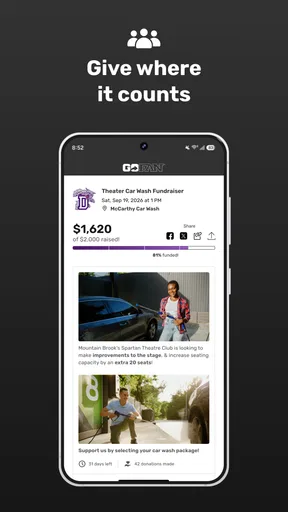
The store summary places sports, theater, and fundraisers at the center, and that matches the kind of situation where the app makes sense. A parent preparing for a school matchup, a student checking admission for a performance, or a supporter attending a fundraising event can all benefit from having the relevant ticket journey on a mobile device. The experience is less about browsing for entertainment inspiration and more about completing a known local transaction with fewer loose ends.
GoFan has built a substantial audience, with over 500 thousand installs and a 4.7 average from around 7.8 thousand ratings. Those figures suggest that the app is familiar to many users, but they do not remove the need to check the event details carefully. Ticketing apps are only as useful as the event information attached to each listing, and the host’s choices still matter.
The current release is version 6.4.7, and the app runs on Android 7.0 or later. That makes it accessible on many older Android phones, which is helpful for families sharing devices or keeping a dependable backup phone. It is free to install, although I would still read the final checkout screen closely because the cost of attending an event is separate from the cost of downloading the app.
Getting from installation to a useful starting point
For a first-time user, I recommend opening the app with one concrete goal in mind. Have the event name, school, team, theater, or organizer available before you begin. That small preparation makes the first session less like wandering through a catalog and more like looking up a specific appointment. If someone sent you an event announcement, keep it nearby so you can compare the listing with the original details.
After installation, take a moment to identify where event discovery and ticket access are handled. The exact layout can change between releases, so I would avoid memorizing the position of a button. Instead, look for the path that leads from an event listing to its ticket information. The important milestone is not simply finding the app’s home screen; it is reaching the correct event page and confirming that it matches what you intended to attend.
This is also where I would pay attention to account or checkout prompts. A ticket app may ask you to provide information at different points in the process, and rushing through those screens can create confusion later. Use the same email address or contact details you normally check for event confirmations. That makes the purchase easier to trace if you need to reopen the app or locate the confirmation message later.
One practical habit is to search using the most distinctive part of the event name first. A school name, venue, or team can be more useful than a broad word such as “football” or “theater.” If several results appear, compare the date, location, and event type before selecting anything. This avoids one of the most common ticketing mistakes: opening a similarly named listing and assuming it is the right one.
Your first successful ticket action
The first meaningful success is reaching a point where you can confidently say, “This is my event, and I know what happens next.” I suggest treating the event page as a checklist rather than tapping through quickly. Verify the title, date, venue, and any visible admission information. If the event is connected to a school or fundraiser, check that the organization shown is the one you recognize.
Once the listing looks right, continue toward the ticket selection or purchase step. Keep an eye on the quantity you choose, especially when buying for a family or group. A useful workflow is to decide in advance how many people are attending, then review the selection once before moving on. That pause is simple, but it reduces the chance of buying too few tickets and having to repeat the process.
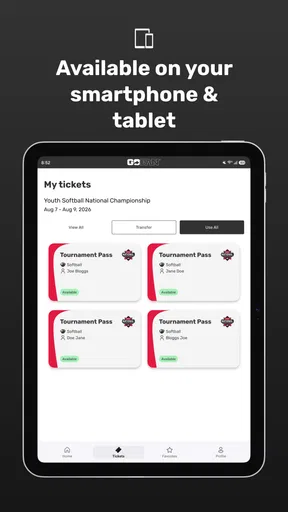
When the transaction is complete, do not close the app immediately. Look for the confirmation or ticket-access screen and make sure you understand how you will return to it. I also recommend checking the email account associated with the purchase, if the process uses one, and saving the event details somewhere you can reach without searching through old conversations. The goal is to make arrival day boring: open the ticket, show the required information, and get inside.
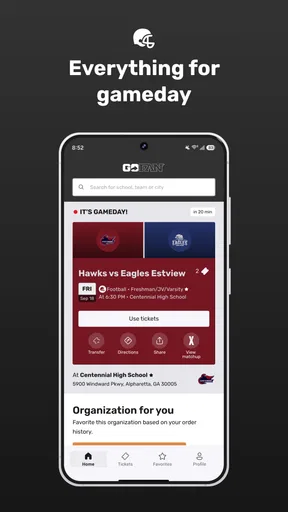
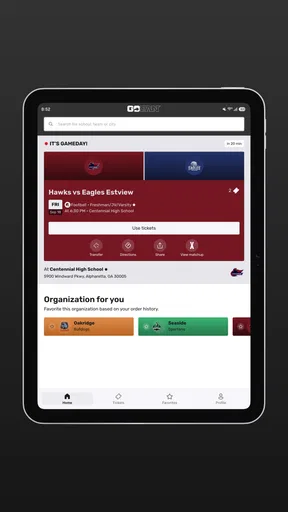
A realistic example is a parent who receives a message on Friday about a Saturday school game. Instead of asking the sender to repeat the admission instructions, the parent opens GoFan, searches for the school, checks the matchup and venue, chooses the needed tickets, and reviews the confirmation before leaving the app. The value is not a flashy feature; it is the reduction of small decisions that otherwise pile up during a busy week.
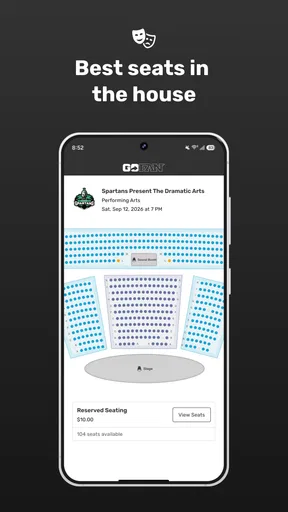
Another useful scenario is a theater performance where several relatives are attending separately. One person can use the listing to confirm that everyone is looking at the same event, while each attendee handles their own ticket process. That can be more manageable than passing around screenshots with incomplete context. I would still agree on the event details first, because convenience does not replace coordination.
Where first-time users can get confused
The biggest source of confusion is assuming that every event in your area must appear. GoFan is not a universal directory of all local activities. Its usefulness depends on whether the organizer has placed the event there. If a school announcement points you toward another ticket method, follow that instruction rather than repeatedly searching the app.
It is also easy to confuse an event listing with proof that the event is still happening exactly as planned. The app can help you access the ticket, but you should still pay attention to the event information shown and any updates provided by the organizer. Weather, venue changes, and schedule adjustments are the kinds of details that can affect your plans. I would not rely on an old screenshot when the live listing is available.
Another point worth understanding is the difference between the app being free and the event being free. GoFan costs nothing to download, but an event may still require admission. Read the checkout summary before confirming, and make sure the number of tickets and the event name are correct. This is especially important when a fundraiser has several related listings, because the most familiar organization name may appear more than once.
Some users may also expect the app to behave like a wallet that automatically solves every entry problem. I would treat it instead as the place to find and manage the ticket information connected to the event. Before leaving home, reopen the relevant ticket and make sure your phone is ready for presentation. If you are attending with children or a group, decide who will hold which tickets so you are not sorting them out at the entrance.
Search results can require a little patience when an event uses an abbreviation, a nickname, or a host name that differs from the wording in the announcement. Try the school or organization first, then narrow the results by the visible event details. This is one of the less obvious trade-offs of a focused ticketing app: it can be efficient once you know the organizer’s naming pattern, but less forgiving when you only remember a vague description.
How it compares with familiar alternatives
Compared with buying directly from a school office or venue desk, GoFan is more convenient when you need to act outside office hours or want the ticket information on your phone. Direct contact can still be better when you have a special question, need help with an unusual arrangement, or are dealing with an event that has not been posted in the app.
Compared with a general ticket marketplace, GoFan’s narrower focus is both its strength and its limitation. A broad marketplace may be better for discovering concerts, professional sports, or large entertainment tours. GoFan makes more sense when your destination is a school, community, theater, or fundraising event and you want to avoid unrelated listings.
Compared with paper tickets, mobile access is easier to organize when plans change or several people are involved. The trade-off is that you need to be comfortable retrieving the ticket on your phone at the right moment. For someone who prefers a printed ticket or has limited phone access, a direct venue option may feel less stressful.
I also see a difference between GoFan and a simple browser search. A search engine can locate an announcement, but it may lead to outdated pages, social posts, or third-party explanations. GoFan gives you a more purposeful route when the event is present in its system. The app is not automatically better in every case; it is better when the organizer’s listing is the authoritative place you were meant to use.
Small habits that make the experience smoother
My first tip is to verify the organizer before selecting tickets. The event title alone is not enough when schools, teams, or theater groups use similar names. Match the organization, date, and venue together. This three-part check is quick and is more reliable than judging by a familiar-looking headline.
My second tip is to complete the ticket process before the day of the event whenever possible. Waiting until you are in a parking lot or standing near an entrance adds unnecessary pressure. A calm review at home gives you time to notice a wrong quantity, an unexpected event listing, or a confirmation you have not yet located.
My third tip is to plan for group access rather than assuming one person will solve everything at the entrance. If you bought for several people, decide whether the group will enter together or whether each person needs access to their own ticket information. This is a small operational detail that many store descriptions ignore, yet it can make the difference between a smooth arrival and a frustrating queue.
My fourth tip is to use the app as a record of the selected event, not as your only source of planning information. Keep the venue address and start time in your calendar if the event matters. That way, the ticket remains focused on admission while your calendar handles travel and reminders. Separating those jobs makes the whole visit easier to manage.
Finally, update the app when a newer release is offered, particularly if you depend on it for an upcoming event. The version installed on your phone is 6.4.7, and keeping software current is a sensible way to avoid preventable compatibility or display issues. I would do this well before arrival rather than while trying to present a ticket.
Who will appreciate it, and who should skip it
GoFan is a strong fit for parents, students, relatives, and local supporters who regularly attend school sports, theater productions, or fundraisers. It is also useful for anyone who dislikes searching through messages for admission instructions. The app’s value grows when the same kinds of community events appear in your calendar throughout the year.
I would be more cautious if you mainly attend major commercial entertainment. A broader ticket service may offer better discovery and coverage for that purpose. Likewise, if the event organizer has clearly chosen another purchasing method, installing GoFan will not improve the process. The app should follow the event’s official instructions, not replace them.
People who are uncomfortable with mobile ticket access may also prefer buying directly when that option exists. GoFan is designed to make phone-based ticket handling practical, but the convenience depends on your willingness to review and retrieve the information digitally. For a group with one shared phone, planning access in advance becomes particularly important.
My recommendation after using it
GoFan succeeds by focusing on a real, recurring problem: getting admission to the kinds of events that often sit between formal box offices and informal community announcements. I like it most when I have a specific school or local event in mind, because the path from discovery to ticket access feels more purposeful than browsing a huge entertainment catalog.
Its limitations are equally clear. It cannot help with events that are not listed, it does not remove the need to check organizer details, and mobile ticketing still requires a little preparation. Those are not reasons to dismiss it; they are reasons to use it with the right expectations.
For a first-time user, my recommended path is simple: install the free app, search by the recognizable organization or venue, confirm the event using its date and location, choose the correct quantity, and reopen the confirmation before you leave. If that workflow matches the way your local events are organized, GoFan is a practical addition to your phone. With its Everyone age rating and support for Android 7.0 and later, it is also approachable for a wide range of users.
Overall, I would recommend GoFan: Buy Tickets to Events to anyone whose school, theater, or fundraising activities use the service. It is not a universal answer for every kind of ticket, but within its area it can turn a scattered set of instructions into a clearer routine. That focused usefulness is why I would keep it installed when community events are part of my regular plans.
Privacy and Permissions
See what permissions an app requests and how it handles your data.
- Calendar
- read calendar events plus confidential information, add or modify calendar events and send email to guests without owners' knowledge
- Location
- approximate location (network-based), precise location (GPS and network-based)
- Photos/Media/Files
- read the contents of your USB storage, modify or delete the contents of your USB storage
- Storage
- read the contents of your USB storage, modify or delete the contents of your USB storage
- Other
- view network connections, full network access, run at startup, draw over other apps, control vibration, prevent device from sleeping, modify system settings, read Google service configuration
Verdict
Strengths of GoFan: Buy Tickets to Events
- Fast mobile ticket purchases for sports, concerts, and school events.
- Digital tickets are stored in one place for convenient venue entry.
- Event listings can be filtered by location and date.
- Supports ticket transfers when plans change.
- Official event listings can reduce the risk of buying invalid tickets.
Limitations of GoFan: Buy Tickets to Events
- Service fees may noticeably increase the final ticket price.
- Some events have limited availability or sell out quickly.
- Refund and cancellation rules vary by event organizer.
- App usefulness depends on participating venues and schools.
- Internet or battery problems can make ticket access difficult at entry.
Similar Picks in This Category
View All
BeSoccer: Soccer Live Score
BeSoccer apps4.3

Cricbuzz - Live Cricket Scores
Cricbuzz.com3.7

NFL
NFL Enterprises LLC2.4

Da Fit
MO YOUNG LIMITED3.6

ESPN
Disney4.5

LiveScore: Live Sports Scores
LiveScore Limited4.5
Frequently Asked Questions
What is GoFan: Buy Tickets to Events used for?
GoFan is a digital ticketing app for discovering and purchasing tickets to school sports, performing arts, concerts, and other local events. After selecting an event, you can review the date, venue, ticket price, and applicable fees before completing checkout. It is especially useful for families and fans who want to keep event tickets on their phone instead of carrying printed copies.
How do I purchase tickets through the GoFan app?
To buy tickets, search for your school, organization, venue, or event and open the relevant listing. Choose the number and type of tickets available, then continue to checkout and provide the requested payment information. Before paying, carefully confirm the event name, date, location, and total cost, since ticket availability, fees, and purchase conditions may vary between organizers.
Can I use GoFan tickets directly from my smartphone?
In most cases, GoFan tickets can be displayed on your smartphone at the entrance rather than printed. Open the app or access your purchase through the confirmation provided after checkout, then show the ticket barcode or digital pass to event staff. It is wise to charge your phone beforehand and save the confirmation information in case internet access is limited at the venue.
Are GoFan ticket purchases refundable or transferable?
Refund, cancellation, and transfer policies are generally determined by the event organizer rather than being identical for every GoFan listing. Before completing a purchase, review the event’s terms and any information shown during checkout. Some tickets may be nonrefundable, while changes caused by postponements or cancellations may follow separate instructions. Contact the organizer or GoFan support when a specific order requires assistance.
Is GoFan safe to download and use for event tickets?
GoFan is designed to provide a convenient way to find events, pay for admission, and present digital tickets. As with any ticketing service, download the official app from the Google Play Store or Apple App Store and check that the developer information is correct. Use a secure payment method, protect your account details, and avoid purchasing tickets through unofficial links or messages.
